
In this post I share a current passion project using R programming.
The goal is to practice data acquisition, data wrangling, and data visualization. I am using data from my Official YouTube Channel where I share my music.
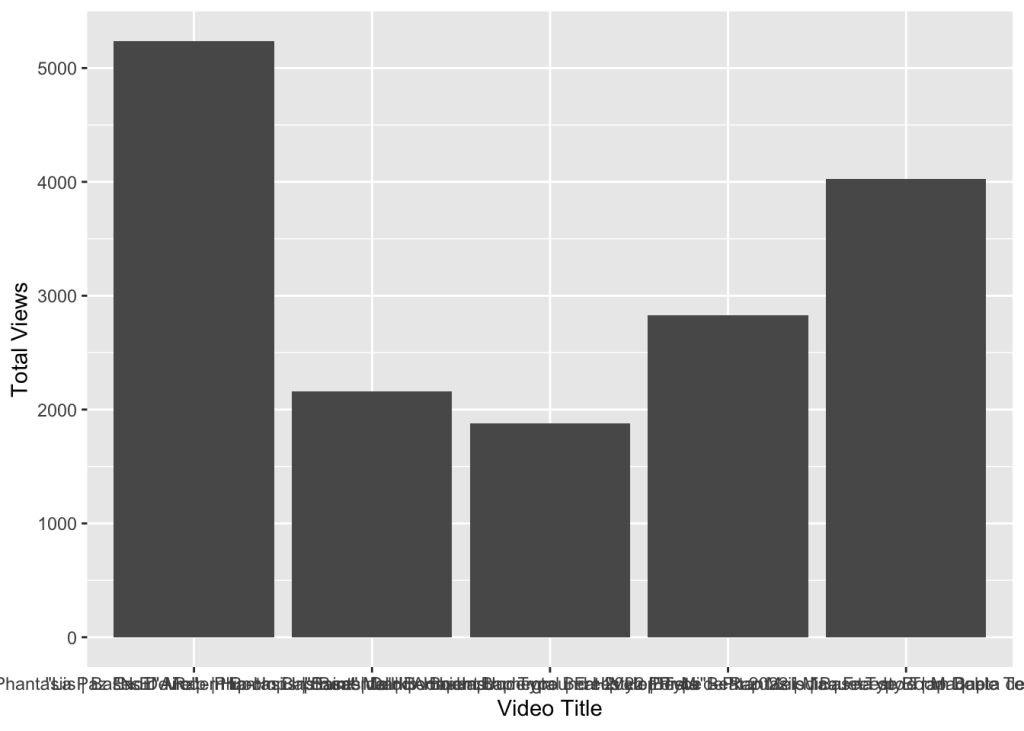
The goal is to showcase visuals that are not on YouTube studio by default. While It took all this code to just show one visual -so far-, I am confident that with time I will add more to it.
I wanted to share this to remember my progress.
I am sure there is a lot to improve here. I welcome any feedback you have.
Here is the actual PDF export from R that looks much cleaner than what I shared here.
Feel free to download it for reference or to tailor it for your needs.
Until then,
Ernesto
 # Project and Contact Info -----
 # YouTube Exploratory Data Analysis (EDA), Data Wrangling and Visualization Exercises
 # A Portfolio Project By Ernesto Gonzales
 # Website: ernestogonzales.com
 # Email: hello@ernestogonzales.com

 # Background ----
 # I downloaded the all my YouTube Studio data from April 1st, 2007 to October 25th 2023
 # 3 Comma Separated Values (CSV)files where downloaded from my website
 # These files were sourced from my own YouTube channel metrics of all my videos

# Project Deliverables ----
 # To showcase a step by step process on Data Wrangling using dplyr and lubridate libraries
 # Showcase my steps on doing EDA by using Visualizations using ggplot2
 # Provide a final report using R Markdown to create both PDF files and PowerPoint reports

# 01. - Data Preparation and Data Wrangling ---- # 01.01 - Libraries Used----
library(tidyverse)
## ── Attaching core
## ✔ dplyr
## ✔ forcats
## ✔ ggplot2
## ✔ lubridate 1.9.3
## ✔ purrr 1.0.2
## ── Conflicts ────────────────────────────────────────── tidyverse_conflicts() ──
## ✖ dplyr::filter() masks stats::filter()
## ✖ dplyr::lag() masks stats::lag()
## i Use the conflicted package (<http://conflicted.r-lib.org/>) to force all conflicts to become errors
library(lubridate)

# 02. - Data Acquisition ----
# 02.2 - Initial Data Acquisition using read.csv command
table_data <- read.csv("~/Documents/00_Data_Projects/Content 2007-04-01_2023-10-26 Phantasiis/Table data.csv") chart_data <- read_csv("~/Documents/00_Data_Projects/Content 2007-04-01_2023-10-26 Phantasiis/Chart data.csv")
## Rows: 30260 Columns: 5
## ── Column specification ──────────────────────────────────────────────────────── ## Delimiter: ","
## chr (3): Content, Video title, Video publish time
## dbl (1): Views
## date (1): Date
##
## i Use `spec()` to retrieve the full column specification for this data.
## i Specify the column types or set `show_col_types = FALSE` to quiet this message.
chart_data
## # A tibble: 30,260 × 5
##    Date       Content     `Video title`               `Video publish time` Views
##    <date>     <chr>       <chr>                       <chr>                <dbl>
##  1 2007-04-01 6Etbk2iY2jA "\"Saint\" Melodic Boom Ba... Apr 27, 2022             0
##  2 2007-04-02 6Etbk2iY2jA "\"Saint\" Melodic Boom Ba... Apr 27, 2022             0
##  3 2007-04-03 6Etbk2iY2jA "\"Saint\" Melodic Boom Ba... Apr 27, 2022             0
##  4 2007-04-04 6Etbk2iY2jA "\"Saint\" Melodic Boom Ba... Apr 27, 2022             0
##  5 2007-04-05 6Etbk2iY2jA "\"Saint\" Melodic Boom Ba... Apr 27, 2022             0
##  6 2007-04-06 6Etbk2iY2jA "\"Saint\" Melodic Boom Ba... Apr 27, 2022             0
##  7 2007-04-07 6Etbk2iY2jA "\"Saint\" Melodic Boom Ba... Apr 27, 2022             0
##  8 2007-04-08 6Etbk2iY2jA "\"Saint\" Melodic Boom Ba... Apr 27, 2022             0
##  9 2007-04-09 6Etbk2iY2jA "\"Saint\" Melodic Boom Ba... Apr 27, 2022             0
## 10 2007-04-10 6Etbk2iY2jA "\"Saint\" Melodic Boom Ba... Apr 27, 2022             0
## # i 30,250 more rows
totals_data <- read_csv("~/Documents/00_Data_Projects/Content 2007-04-01_2023-10-26 Phantasiis/Totals.csv")
## Rows: 6052 Columns: 2
## ── Column specification ──────────────────────────────────────────────────────── ## Delimiter: ","
## dbl (1): Views
## date (1): Date
##
## i Use `spec()` to retrieve the full column specification for this data.
## i Specify the column types or set `show_col_types = FALSE` to quiet this message.
1.1.3
1.0.0
3.4.4
✔ readr ✔ stringr ✔ tibble ✔ tidyr
2.1.4
1.5.0
3.2.1
1.3.0
tidyverse packages ──────────────────────── tidyverse 2.0.0 ──
totals_data
## # A tibble: 6,052 × 2 ## Date Views ## <date> <dbl> ## 1 2007-04-01 0 ## 2 2007-04-02 0 ## 3 2007-04-03 0 ## 4 2007-04-04 0 ## 5 2007-04-05 0 ## 6 2007-04-06 0 ## 7 2007-04-07 0 ## 8 2007-04-08 0 ## 9 2007-04-09 0 ## 10 2007-04-10 0 ## # i 6,042 more rows

# Data Preview
table_data %>%
    glimpse() %>%
view()
## Rows: 393
## Columns: 7
## $ Content
## $ Video.title
## $ Video.publish.time
## $ Views
<chr> "Total", "VoitAdnwgnM", "D7PR8ezIUB...
<chr> "", "\"Esencia\" - Phantasiis | Bas...
<chr> "", "Oct 31, 2021", "Oct 29, 2021",...
<int> 91288, 5238, 4029, 2826, 2158, 1878...
<dbl> 2155.0593, 183.1138, 97.3285, 46.11...
<int> 687645, 36660, 23803, 47673, 15151,...
## $ Watch.time..hours.
## $ Impressions
## $ Impressions.click.through.rate.... <dbl> 6.39, 7.32, 9.58, 4.08, 6.06, 7.81,...
chart_data %>%
    glimpse() %>%
view()
## Rows: 30,260
## Columns: 5
## $ Date
## $ Content
<date> 2007-04-01, 2007-04-02, 2007-04-03, 2007-04-04, ...
<chr> "6Etbk2iY2jA", "6Etbk2iY2jA", "6Etbk2iY2jA", "6Et...
<chr> "\"Saint\" Melodic Boom Bap Type Beat 2022 | Pist...
## $ `Video title`
## $ `Video publish time` <chr> "Apr 27, 2022", "Apr 27, 2022", "Apr 27, 2022", "... ## $ Views <dbl>0,0,0,0,0,0,0,0,0,0,0,0,0,0,0,0,0...

# 03.00  - Initial Data Wrangling ----

# 03.01 - Table.csv -----

# Using pipes %>% with dyplyr commands to transform column names for legibility
# Used the mdy() command from lubridate in combination with mutate() function from dyplr
# To format the raw date in to MM-DD-YYYY time format for future analysis
table_data_wrangled_tbl <- table_data %>% mutate(video_published_time_clean = Video.publish.time %>% mdy()) %>%
mutate("Video ID"
       "Video Title"
= Content,
= Video.title,
= Impressions.click.through.rate....,
"ICR"
"Watchtime Hours" = Watch.time..hours.,
"Published Date"  = video_published_time_clean)

# After creating the new labels I used the select() command to isolate the new columns with proper names
# Created a new table that includes the new formatted date and new names
# It will be the basis for future analysis
table_wrangled_renamed <- table_data_wrangled_tbl %>% select(`Video ID`, `Video Title`, Impressions, ICR, Views,
`Watchtime Hours`, `Published Date`)

# 03.02 - Chart.csv ----

#chart_data %>% reframe(.by = Content, `Video title`, `Video publish time`,`Impressions click-through rate (%)`)
view(chart_data)
chart_data_wrangled <- chart_data %>% mutate(`Video publish time` %>% mdy()) %>%
    select(`Video publish time`, Content, `Video title`, `Video publish time`, Date, `Views`)
chart_data_wrangled %>%
    view()
# 03.03 - Totals.csv ----
totals_data %>%
    view()
# Data has the correct format
# A potential insight is to do a time series analysis based on the number of videos that got a CTR per 90 days

# 04. EDA using ggplot2 ----

#Initial Data Visualizations  -----
chart_data_wrangled
## # A tibble: 30,260 × 5
##    `Video publish time` Content
`Video title`
Date Views
## <chr>
## 1 Apr 27, 2022 ## 2 Apr 27, 2022 ## 3 Apr 27, 2022 ## 4 Apr 27, 2022 ## 5 Apr 27, 2022 ## 6 Apr 27, 2022 ## 7 Apr 27, 2022 ## 8 Apr 27, 2022 ## 9 Apr 27, 2022 ## 10 Apr 27, 2022 ## # i 30,250 more
<chr>
6Etbk2iY2jA "\"Saint\" Melodic Boom Ba... 2007-04-01     0
6Etbk2iY2jA "\"Saint\" Melodic Boom Ba... 2007-04-02     0
6Etbk2iY2jA "\"Saint\" Melodic Boom Ba... 2007-04-03     0
6Etbk2iY2jA "\"Saint\" Melodic Boom Ba... 2007-04-04     0
6Etbk2iY2jA "\"Saint\" Melodic Boom Ba... 2007-04-05     0
6Etbk2iY2jA "\"Saint\" Melodic Boom Ba... 2007-04-06     0
6Etbk2iY2jA "\"Saint\" Melodic Boom Ba... 2007-04-07     0
6Etbk2iY2jA "\"Saint\" Melodic Boom Ba... 2007-04-08     0
6Etbk2iY2jA "\"Saint\" Melodic Boom Ba... 2007-04-09     0
6Etbk2iY2jA "\"Saint\" Melodic Boom Ba... 2007-04-10     0
                   rows
glimpse(chart_data_wrangled)
## $ Content
## $ `Video title`
## $ Date
## $ Views
<chr> "6Etbk2iY2jA", "6Etbk2iY2jA", "6Etbk2iY2jA", "6Et... <chr> "\"Saint\" Melodic Boom Bap Type Beat 2022 | Pist... <date> 2007-04-01, 2007-04-02, 2007-04-03, 2007-04-04, ... <dbl>0,0,0,0,0,0,0,0,0,0,0,0,0,0,0,0,0...
<chr>
<date> <dbl>
## Rows: 30,260
## Columns: 5
## $ `Video publish time` <chr> "Apr 27, 2022", "Apr 27, 2022", "Apr 27, 2022", "...
chart_data_clean <- chart_data_wrangled %>% mutate("Video Published Date" = `Video publish time` %>% mdy()) %>%
    select(Content, `Video title`, `Video Published Date`, Date, Views)
chart_views_by_video_title <- reframe(chart_data_clean,.by = `Video title`, Views) %>% group_by(`Video title`)
total_views_by_video_title <- reframe(chart_views_by_video_title, `Video title`, Views)
total_views_sum_by_title <- total_views_by_video_title %>%
    group_by(`Video title`) %>%
    summarise(sum(Views))
Video_titles <- as.factor(total_views_sum_by_title$`Video title`) %>% bind_cols(total_views_sum_by_title$`sum(Vie
ws)`)
## New names:
## • `` -> `...1`
## • `` -> `...2`
viz_total_views <- ggplot(data = Video_titles, aes(`...1`,`...2`))
viz_total_views_labeled <- viz_total_views + geom_col(mapping = aes(`...1`, `...2`)) +
    scale_fill_brewer("Spectral", type = "seq", palette = 1, direction = 1) +
    labs( x = "Video Title", y = "Total Views")
viz_total_views_labeled
 Ernesto Gonzales, MSDA