Category: Data Projects

  • Power BI Dashboard: Cybersecurity Operations Monitoring

    Power BI Dashboard: Cybersecurity Operations Monitoring

    Project Overview

    A comprehensive 3-page Power BI dashboard providing real-time visibility into cybersecurity operations, vulnerability management, and compliance tracking across 500+ enterprise systems.

    Built for: Executive decision-making and security operations prioritization
    Timeline: October – November 2025
    Tools: Power BI Pro, DAX, Power Query, SQL

    ๐Ÿ”— Explore Interactive Dashboard

    ๐Ÿ’ป View Code on GitHub

    The Challenge

    Security teams at enterprise organizations struggle with:

    โŒ Visibility gaps – 500+ vulnerabilities scattered across multiple systems
    โŒ Priority confusion – Which issues need immediate attention?
    โŒ Compliance complexity – Tracking SOC 2, ISO 27001, NIST requirements
    โŒ Manual reporting – Hours spent preparing status updates for executives

    The question leadership asks: “What’s critical RIGHT NOW?”

    Most teams can’t answer quickly.

    My Approach

    I designed a 3-page dashboard that tells a complete operational story:

    1. Executive Summary – 30-second status scan for C-suite
    2. Vulnerability Management – Detailed analysis for security teams
    3. Compliance Tracking – Framework monitoring for audit preparation

    Each page serves a specific audience with the exact insights they need.

    Page 1: Executive Summary
    Purpose: High-level operational status for C-suite and security leadership

    Key Metrics Tracked:

    ๐Ÿ“Š Current Status

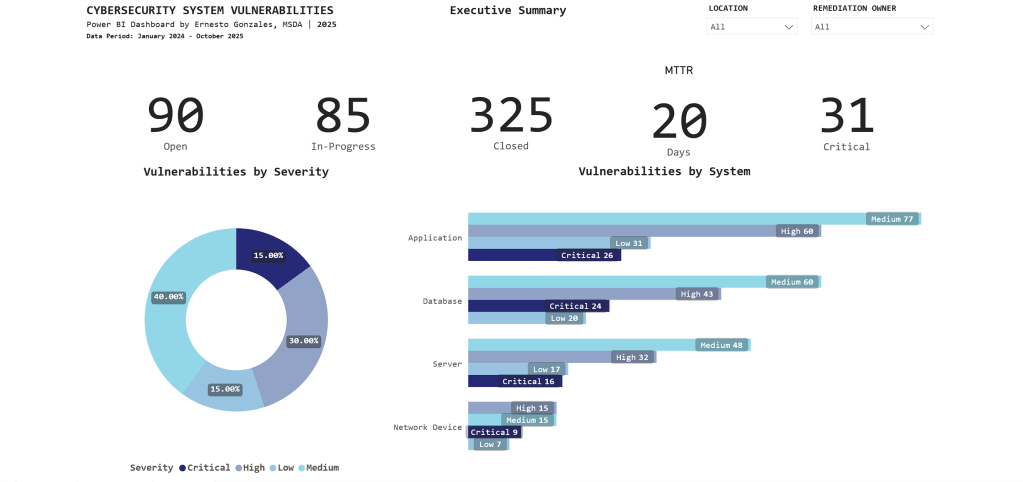
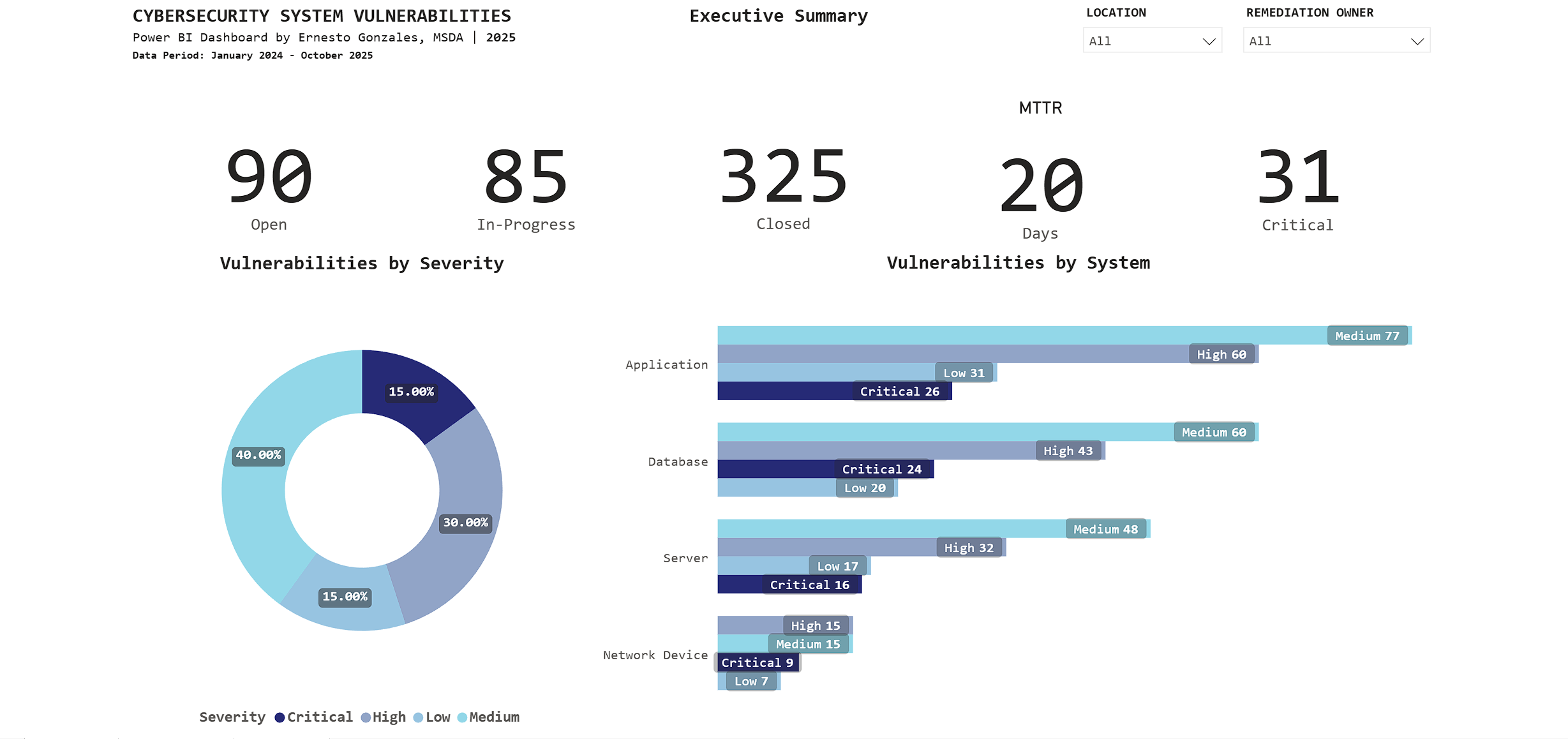
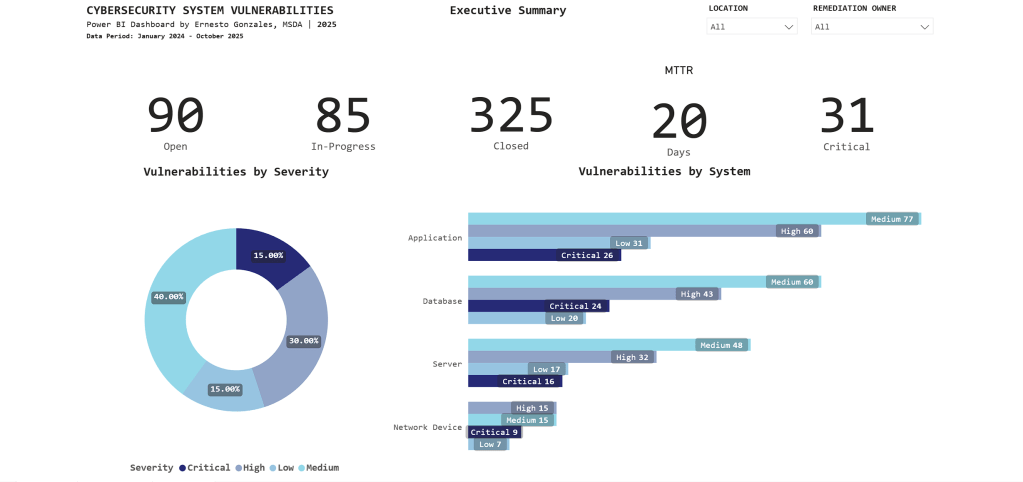
    • 90 Open vulnerabilities
    • 85 In-Progress
    • 325 Closed (78% closure rate – exceeds industry average of 65%)

    โฑ๏ธ Performance

    • 20-day average time to remediate (meets SLA target of <25 days)
    • 31 Critical vulnerabilities requiring immediate attention

    ๐ŸŽฏ Risk Profile

    • Severity distribution: 40% Medium, 30% High, 15% Critical, 15% Low
    • Applications have highest count: 194 total (26 Critical)

    Key Insight:

    The stacked bar chart reveals Applications have 26 Critical vulnerabilities – immediately directing security teams to prioritize application patching over other system types.

    Interactive features: Filter by Location and Remediation Owner for drill-down analysis.

    Page 2: Vulnerability Management
    Purpose: Operational intelligence for security teams to identify trends, aging vulnerabilities, and prioritize remediation work

    What This Page Reveals:

    ๐Ÿ“ˆ Trend Analysis

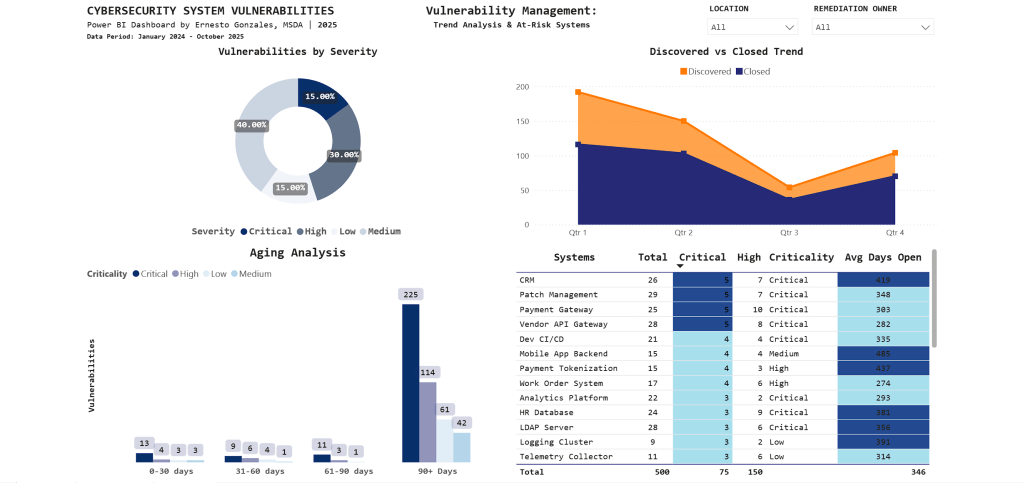
    • Q1 2024: 195 vulnerabilities discovered (annual audit spike)
    • Q3 2025: Discovery and closure rates converging (improvement)
    • Clear quarterly patterns guide resource planning

    โฐ Aging Analysis

    • 225 vulnerabilities aged 90+ days (backlog requiring escalation)
    • Stacked by severity: Most are Medium priority, but Critical items exist
    • Visual immediately shows if urgent issues are aging too long

    ๐ŸŽฏ At-Risk Systems

    SystemCriticalHighAvg Days Open
    CRM57415
    Patch Management57348
    Payment Gateway510303

    Key Insight:

    CRM system has 5 Critical vulnerabilities with 415-day average age – the conditional formatting (dark blue highlighting) draws immediate attention to this urgent remediation priority.

    Technical note: The aging chart uses a stacked column design to show severity composition within each time bucket – revealing that not all aged vulnerabilities are equal priority.

    Page 3: Compliance Tracking

    Purpose: Framework compliance monitoring for audit committees and risk management

    Compliance Status:

    ๐Ÿ“Š Overall Score: 78%

    • Target: 80% (currently 2.34% below)
    • Q3 2025 peak: 95%
    • Q4 2025 decline: 78%

    ๐Ÿ“‰ What Happened in Q4?

    The trend line tells the story: Compliance peaked at 95% in Q3, then dropped to 78% in Q4. This reflects a comprehensive year-end audit that identified previously undetected gaps.

    Framework Breakdown:

    SOC 2 Type II: 77 findings (highest count)

    • 6 Critical
    • 14 High
    • 38 Medium
    • 19 Low

    ISO 27001: 74 findings
    NIST SP 800-53: 24 findings
    PCI DSS: 7 findings

    Business Unit Performance:

    • Operations: 79% (lowest – needs focused support)
    • HR: 81%
    • IT: 83%
    • Finance: 86%
    • Security: 89%
    • Other: 100%

    Key Insight:

    The matrix visual groups findings by framework and severity, revealing that SOC 2 Type II compliance requires immediate attention with 77 total findings concentrated in monitoring and malicious software controls.

    Technical Highlights

    Data Architecture

    Data Model: Star schema design

    • Fact Table: Vulnerabilities (500 rows)
    • Dimension Tables: Systems (30 rows), Compliance (200 rows)
    • Date Table: Custom DAX-generated calendar (2024-2025)

    Relationships: One-to-many from Systems โ†’ Vulnerabilities

    Advanced Power BI Features

    โœ… Custom DAX Measures

    MTTR = 
    CALCULATE(
        AVERAGE(Vulnerabilities[Days_To_Remediate]),
        Vulnerabilities[Status] = "Closed"
    )
    
    Critical Count = 
    CALCULATE(
        COUNTROWS(Vulnerabilities),
        Vulnerabilities[Severity] = "Critical"
    )

    โœ… Conditional Formatting
    Gradient scales automatically highlight high-priority items using color intensity

    โœ… Cross-Page Filtering
    Slicers enable multi-dimensional analysis across all visualizations

    โœ… Matrix Visuals
    Hierarchical grouping by framework reveals compliance patterns

    โœ… Time Intelligence
    Trend analysis with quarter-over-quarter comparisons

    Design Principles Applied

    Color Strategy:

    • Blue gradient palette for professional, corporate appearance
    • Darker shades indicate higher priority/urgency
    • Minimal accent colors (orange for targets only)
    • Consistent across all pages

    Information Hierarchy:

    • Page 1: Summary metrics (executive 30-second scan)
    • Page 2: Operational details (daily security team use)
    • Page 3: Compliance monitoring (audit preparation)

    Real-World Applications

    This dashboard structure is used in:

    ๐Ÿข Security Operations Centers (SOC)
    Real-time monitoring and incident prioritization

    ๐Ÿ”’ Risk Management
    Executive reporting on security posture and compliance status

    ๐Ÿ“‹ Audit Preparation
    Framework compliance tracking for SOC 2, ISO 27001, NIST assessments

    ๐Ÿ‘” Board Presentations
    C-suite visibility into cybersecurity operations

    Industries:

    Utilities โ€ข Financial Services โ€ข Healthcare โ€ข Government โ€ข Technology

    Based On:

    This structure mirrors production dashboards I worked with in the Energy sector, where I tracked $50M+ IT operations and cybersecurity compliance for utility infrastructure.

    What This Project Demonstrates

    Technical Skills

    โœ… Power BI Pro (advanced visualizations, DAX, Power Query)
    โœ… Data modeling (star schema, relationships, calculated columns)
    โœ… Business intelligence (KPIs, trend analysis, conditional formatting)
    โœ… SQL (data extraction and transformation)

    Business Acumen

    โœ… Cybersecurity domain knowledge
    โœ… Risk-based prioritization thinking
    โœ… Executive communication (distilling technical data for leadership)
    โœ… Compliance framework understanding (SOC 2, ISO 27001, NIST)

    Soft Skills

    โœ… Translating business requirements into technical solutions
    โœ… Information design and visual communication
    โœ… Stakeholder-focused reporting

    Portfolio Quality

    This isn’t a tutorial project. It’s production-ready work that could be deployed in enterprise environments today.

    Explore the Project

    ๐Ÿ”— Interactive Dashboard

    Launch Dashboard
    Try the filters, explore the data, see how interactive visualizations guide decision-making.

    ๐Ÿ’ป GitHub Repository

    View Code & Documentation
    Complete technical documentation, DAX measures, data model structure, and design decisions.

    ๐Ÿ“บ Video Walkthrough

    Coming This Week
    5-minute guided tour explaining the business problem, technical approach, and key insights.


    Let’s Connect

    Interested in discussing data analytics, Power BI best practices, or cybersecurity operations?

    ๐Ÿ“ง Email: hello@ernestogonzales.com
    ๐Ÿ’ผ LinkedIn: linkedin.com/in/eg-data
    ๐Ÿ’ป GitHub: github.com/ernestog27
    ๐ŸŒ More Projects: Browse Portfolio


    Ernesto Gonzales, MSDA
    Data Analyst | San Diego, CA
    Master’s Degree in Data Analytics, Western Governors University

    Specializing in Power BI, SQL, Python, and transforming complex operations into executive insights.

  • Building a RESTful API for Sentiment Analysis

    Building a RESTful API for Sentiment Analysis

    This is a project on creating an NLP Model deployment using Python, Flask, and Postman.

    Project Overview

    This project is a sentiment analysis tool. It classifies text (movie reviews) as positive or negative. This classification is done using natural language processing (NLP) techniques. It includes:

    – Text Pre-processing

    – Machine Learning Model Training

    – Flask API Development

    This project allows users to enter a sentence. They can receive a prediction of its sentiment, either positive or negative, via an API endpoint.

    Dataset

    Dataset Name: UCI Sentiment Labelled Sentences

    Description: This dataset contains labeled sentences categorized as positive (1) or negative (0).

    Source: UCI Machine Learning Repository

    Data Format: .txt file with sentences and labels.

    Project Workflow

    The project consists of several main steps:

    1. Data Loading: Loading and reading the .txt file format of the dataset.

    2. Data Pre-processing: Cleaning and tokenizing text, removing stopwords.

    3. Feature Extraction: Converting text data into numerical features using TF-IDF Vectorizer.

    4. Model Training: Training a logistic regression model on the pre-processed data.

    5. Model Evaluation: Evaluating the model on test data and assessing its performance.

    6. API Development: Creating an API with Flask to expose the model as a service.

    Model Training and Evaluation

    Algorithm Used: Logistic Regression

    Feature Engineering: TF-IDF Vectorizer

    Evaluation Metrics:

    – Accuracy: Measured to determine the overall performance of the model.

    – Confusion Matrix: Visualizes the classification performance.

    API Development

    I created a RESTful API using Flask. It allows users to make POST requests with sentences about movie reviews. Users can then receive sentiment predictions.

    Endpoint: /predict

    Method: POST

    Expected Input: JSON payload with a ‘sentence’ field.

    {“sentence”: “I love this movie!”}

    Response:

    {“prediction”: 1}

    Setup and Installation

    Prerequisites: Python 3.7+, pip for package management

    Installation Steps:

    1. Clone the Repository:

    git clone https://github.com/ernestog27/data-projects.git

    2. Create and Activate a Virtual Environment:

    python3 -m venv sentiment_env

    source sentiment_env/bin/activate

    3. Install Required Libraries:pip install -r requirements.txt

    4. Run the Flask Application:

    NLP_sentiment_analysis.py

    Usage

    Using Postman to Test the API:

    1. Open Postman and set the request method to POST.

    2. Enter the endpoint URL: http://127.0.0.1:5000/predict

    3. Set Headers:

    – Key: Content-Type, Value: application/json

    4. Request Body: Choose ‘raw’ and JSON format, then enter:

    {“sentence”: “This movie is amazing!”}

    5. Send Request: Postman will return the sentiment prediction.

    Results

    Accuracy: The model achieved an accuracy of 75.3% on the test dataset.

    Sample Predictions:

    – ‘The movie was fantastic!’ -> Positive (1)

    – ‘I did not enjoy the movie.’ -> Negative (0)

    Confusion Matrix:

    Future Improvements

    Expand Dataset: Add more labeled sentences for training.

    Model Optimization: Experiment with other models (e.g., SVM, neural networks) and hyper-parameter tuning.

    Real-Time Updates: Retrain the model periodically with new data to improve prediction accuracy.

    References:

    Kotzias, D. (2015). Sentiment Labelled Sentences [Dataset]. UCI Machine Learning Repository. https://doi.org/10.24432/C57604.

    Here is the link for latest python code:

    And below is a snapshot of the code for illustration purposes as of November 2024.

    For the latest see link above.

    # Sentiment Analysis API with Flask
    # Ernesto Gonzales, MSDA
    
    import pandas as pd
    
    # Loading the dataset
    data = pd.read_csv('sentiment_env/databases/sentiment labelled sentences/imdb_labelled.txt', delimiter = '\t', header = None)
    data.columns = ['Sentence', 'Label'] # Rename columns for clarity
    
    # Data preview
    print(data.head())
    print(data.info())
    print(data['Label'].value_counts())
    
    # Data Cleaning and Pre-processing 
    
    import nltk
    from nltk.corpus import stopwords
    from nltk.tokenize import word_tokenize
    import re
    
    # Downloading necessary NLTK data
    
    nltk.download('stopwords')
    nltk.download('punkt_tab')
    
    # Function for text cleaning
    
    def preprocess_text(text):
        text = re.sub(r'\W', ' ', text) # Remove non-word characters
        text = text.lower() # Convert text to lowercase
        words = word_tokenize(text) # Tokenize text
        words = [word for word in words if word not in stopwords.words('english')] # Remove stopwords
        return ' '.join(words)
    
    # Applying function to the text column
    
    data['Cleaned_Sentence'] = data['Sentence'].apply(preprocess_text)
    
    # Spliting data into training and testing sets
    
    from sklearn.model_selection import train_test_split
    X = data['Cleaned_Sentence']
    y = data['Label']
    X_train, X_test, y_train, y_test = train_test_split(X, y, test_size = 0.2, random_state = 42)
    
    # Feature extraction
    
    from sklearn.feature_extraction.text import TfidfVectorizer
    vectorizer = TfidfVectorizer(max_features = 5000)
    X_train_tdif = vectorizer.fit_transform(X_train)
    X_test_tfidf = vectorizer.transform(X_test)
    
    # Training and Evaluating model
    
    from sklearn.linear_model import LogisticRegression
    
    model = LogisticRegression()
    model.fit(X_train_tdif, y_train)
    
    from sklearn.metrics import accuracy_score, classification_report
    
    y_pred = model.predict(X_test_tfidf)
    print(f"Accuracy: {accuracy_score(y_test, y_pred)}")
    print(classification_report(y_test,y_pred))
    
    from sklearn.metrics import ConfusionMatrixDisplay, confusion_matrix
    import matplotlib.pyplot as plt 
    
    ConfusionMatrixDisplay.from_predictions(y_test, y_pred)
    
    # Confusion matrix
    cm = confusion_matrix(y_test, y_pred)
    disp = ConfusionMatrixDisplay(confusion_matrix=cm)
    
    # Display the confusion matrix
    disp.plot()
    plt.title("Confusion Matrix")
    plt.show()
    
    # Preparation for Deployment
    
    import joblib
    
    joblib.dump(model, 'model.pkl')
    joblib.dump(vectorizer, 'vectorizer.pkl')
    
    # Creating a Simple API with Flask
    
    from flask import Flask, request, jsonify
    import joblib
    
    app = Flask(__name__)
    
    # Loading the saved model and vectorizer
    
    model = joblib.load('model.pkl')
    vectorizer = joblib.load('vectorizer.pkl')
    
    @app.route('/predict', methods = ['POST'])
    def predict():
        data = request.get_json(force = True)
        sentence = data['sentence']
        sentence_tfidf = vectorizer.transform([sentence])
        prediction = model.predict(sentence_tfidf)
        return jsonify({'prediction': int(prediction[0])})
    
    if __name__ == '__main__':
        app.run(debug=True)
        

    I hope this helps. Let’s learn and create more.

    Until the next time,

    Ernesto Gonzales, MSDA.